 Makerstorage
Open source · Hosted or self-hosted · AGPL-3.0
Know where every part is.
Makerstorage is an inventory manager for makerspaces and fablabs, built for electronic components. Keep stock accurate down to the drawer, and reorder before you run out.
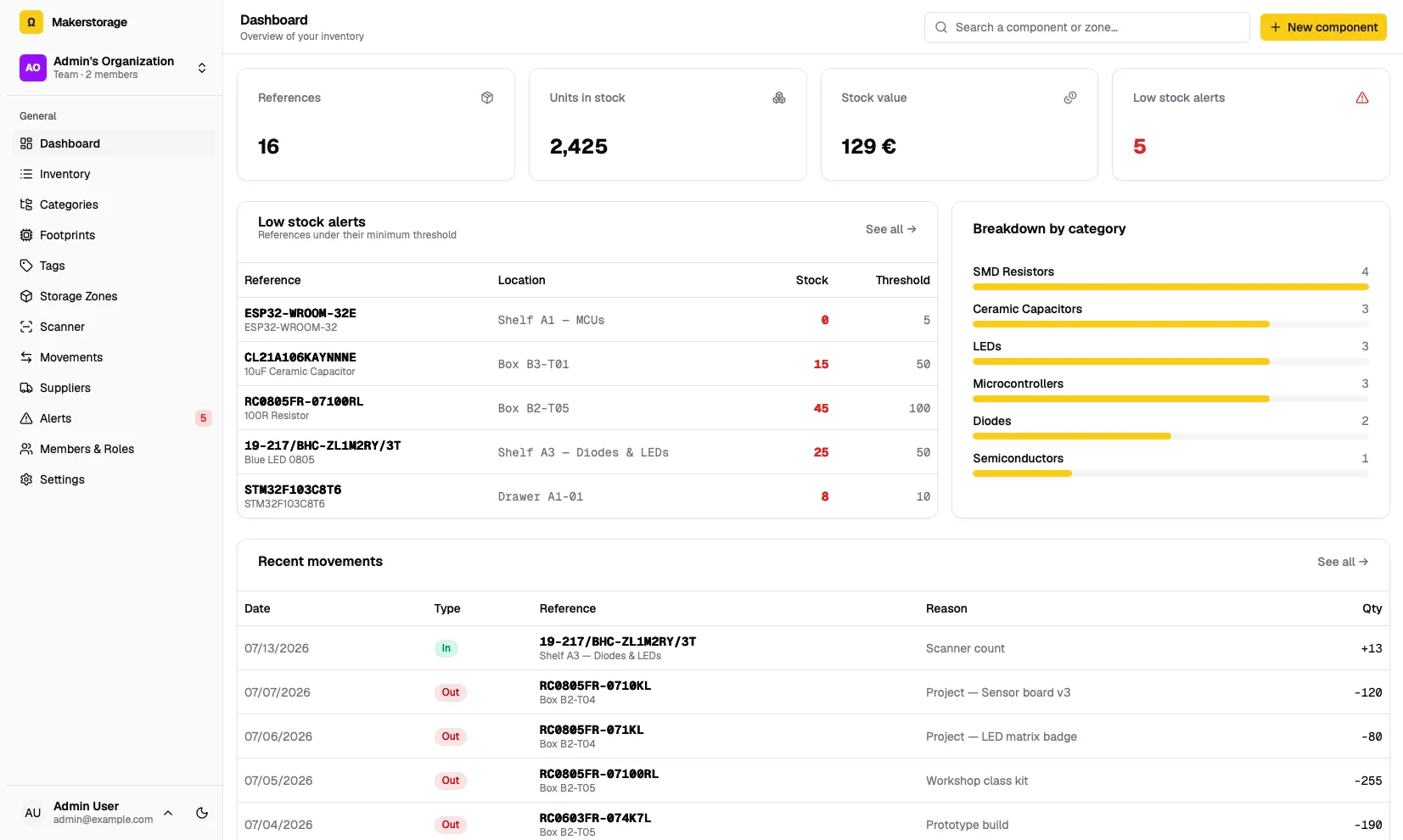
Everything a parts room needs
Not a generic stock tool with resistors bolted on. Makerstorage knows about footprints, MPNs, BOMs and the reality of a shared workshop.
A real parts catalog
SKU, MPN, barcode, manufacturer, specs, datasheets and per-supplier pricing. Organize with nested categories, reusable footprints and tags.
Stock down to the drawer
Model your space as a tree of rooms, cabinets, shelves, benches, drawers and boxes, and track quantities for every part in every location.
An append-only ledger
Every change is a stock movement with a reason. Quantities can't silently drift, and you always know who took what, and why.
Scan, don't type
Point a phone or webcam at a barcode to look a part up and record what goes in or out, right at the shelf.
Low-stock alerts
Set a minimum per part. Reorder suggestions account for what's already on order, so nobody double-orders.
Suppliers & purchase orders
Generate orders, follow them from pending to received, and split deliveries across storage zones. Look parts up and import orders from Mouser and DigiKey.
Project BOMs
Import a bill of materials, see at a glance what you can build, order the shortfall, and deduct parts when the build is done.
Built for teams
Each organization's data is isolated. Invite members as owner, admin, member or viewer: read-only access for students, full control for staff.
Bring your spreadsheet
Bulk-load an existing inventory from CSV, including files saved by Excel. Categories and locations are created on the way in.
From a messy drawer to a tidy ledger
- 01
Catalog
Import your spreadsheet or pull part details straight from a supplier catalog.
- 02
Store
Map your shelves, drawers and boxes, then scan stock in and out as people use it.
- 03
Build & reorder
Check a BOM against what's on hand, and reorder what's running low before a workshop, not during it.
Hosted or self-hosted, your call
Same app, same features. Start on the hosted instance in a minute, or run your own copy on your own hardware.
Use the hosted version
Create an account on app.makerstorage.io and you get your own organization right away. Nothing to install: invite your team and start cataloging.
Free, run by the maintainer on a best-effort basis, with no SLA. Self-host if you need guarantees.
Run it yourself
Keep your data on your own hardware. One Docker image, SQLite included, published for amd64 and arm64. A small server on your workshop's network is plenty.
Your data, on your hardware
Makerstorage ships as a single Docker image backed by SQLite, so there's no external database to run. Put it on a small server on your workshop's network and you're done.
Keep the secrets you generate: they sign sessions and encrypt the supplier API keys stored in the database. The README covers secrets, email and building from source.
# Once: generate these, store them somewhere safe and reuse them.
SECRET_KEY_BASE=$(openssl rand -hex 64)
AR_ENCRYPTION_PRIMARY_KEY=$(openssl rand -hex 32)
AR_ENCRYPTION_DETERMINISTIC_KEY=$(openssl rand -hex 32)
AR_ENCRYPTION_KEY_DERIVATION_SALT=$(openssl rand -hex 32)

docker run -d --name makerstorage \
  -p 3000:80 \
  -e SECRET_KEY_BASE="$SECRET_KEY_BASE" \
  -e AR_ENCRYPTION_PRIMARY_KEY="$AR_ENCRYPTION_PRIMARY_KEY" \
  -e AR_ENCRYPTION_DETERMINISTIC_KEY="$AR_ENCRYPTION_DETERMINISTIC_KEY" \
  -e AR_ENCRYPTION_KEY_DERIVATION_SALT="$AR_ENCRYPTION_KEY_DERIVATION_SALT" \
  -v makerstorage-storage:/rails/storage \
  ghcr.io/albanpetit/makerstorage:latest
Then open http://localhost:3000 and create your account.